3D animation and web design software
Ulead Cool 3D is a nice, trial version software only available for Windows, that is part of the category Design & photography software with subcategory 3D Design (more specifically Fonts & Logos) and has been created by Ulead.
Top Recommended Alternative
More about Ulead Cool 3D
Since we added this program to our catalog in 2005, it has already reached 131,012 downloads, and last week it achieved 63 downloads.
It's available for users with the operating system Windows 98 and former versions, and you can get it only in English. The program version is 3.5 and it has been updated on 12/11/2001.
About the download, Ulead Cool 3D is a slick program that takes up less storage than the average program in the category Design & photography software. It's very heavily used in some countries such as Indonesia, Malaysia, and Sri Lanka.

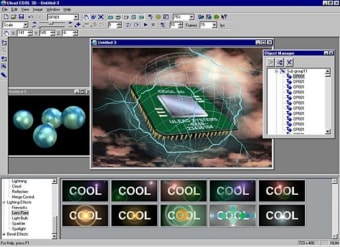
Ulead® COOL 3D™ 3.5 allows designers to create high-impact 3D images. Output these 3D images as still graphics, animations, video or Macromedia® Flash™.
With COOL 3D 3.5, your text and shapes are easily customizable into eye-catching 3D. It only takes a couple of clicks to access many convenient features:
- Group/ungroup text and objects
- Import Adobe® Illustrator® 8.0 files
- Import asymmetrical DirectX® objects
- Create or trace vector objects with the Path Editor
- Switch to Wireframe mode
- Access versatile output options
Ulead COOL 3D's animation timeline is easy to use, yet powerful. Make your animation stand out with special effects you can drag-and-drop from the EasyPalette™:
- Animate objects to move in any direction
- Customize 26 stunning Special Effects. Add even more with PLUG-IN MADNESS II & III
- Download free backgrounds, textures and presets bi-monthly to ensure you have limitless creative options
Making 3D objects for Macromedia® Flash™ just got easier! Output vector-based Flash with the new EnVector module, a bonus tool for Flash fans:
- Edit in the familiar COOL 3D WYSIWYG editing environment
- View the vector-only output in a seperate interface for precise editing
- Import Adobe® Illustrator® 8.0 files or use the Path Editor for enhanced creativity
- Import elements to Macromedia Flash and still be able to edit them